Laura Criado
Case study · MobileCaso de estudio · Móvil

WITHU

Connecting heartsConectando corazones

A Design Thinking concept, built from scratch, to make dog adoption simpler and help prevent abandonment.

Un concepto de Design Thinking, creado desde cero, para que adoptar un perro sea más sencillo y ayudar a prevenir el abandono.

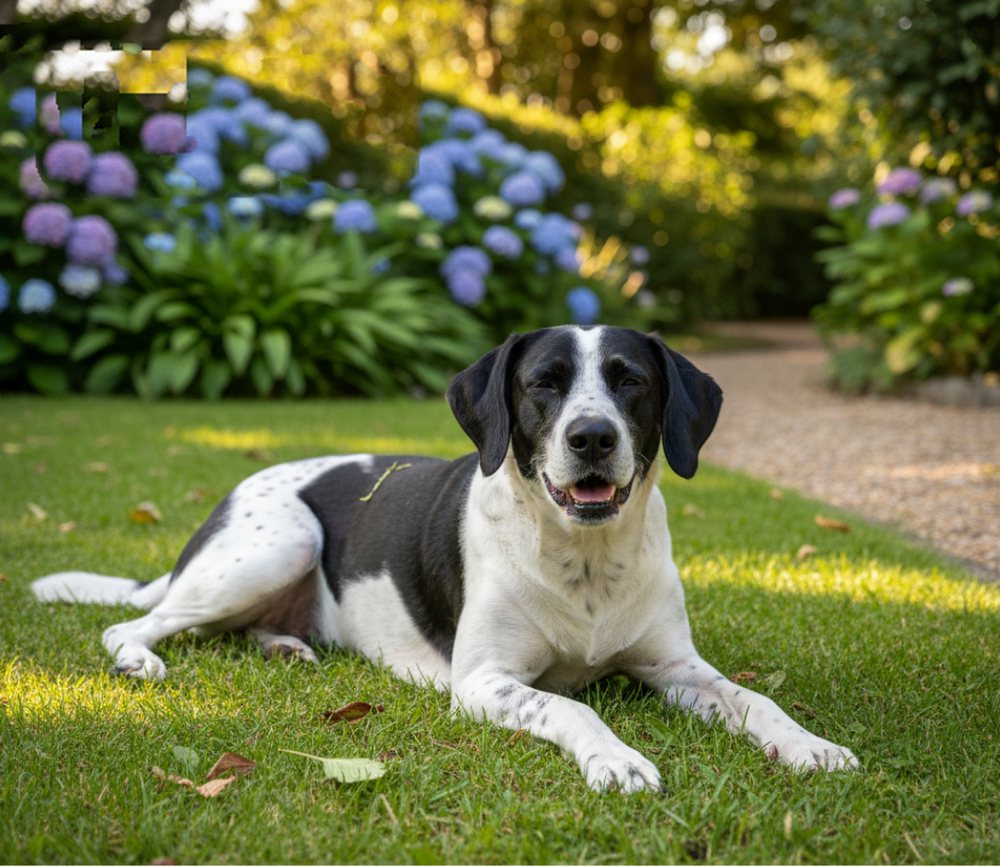
WITHU Adopta screen: photo cards of dogs with their name, age and a heart to save them
Tara
Silvi
Noa
Cris
Pedro
Team
Equipo
1 UX/UI designer
1 diseñadora UX/UI
Deliverable
Entregable
Research insights, user journeys, information architecture and app wireframes
Insights de investigación, recorridos de usuario, arquitectura de información y wireframes de la app
My role
Mi rol
Product Design
Diseño de producto
Platform
Plataforma
iOS · Android
Duration
Duración
12 weeks
12 semanas
Tools
Herramientas
Figma
01

Overview

Resumen

The challengeEl reto

Designing a frictionless digital solution from scratch that addresses the emotional and logistical barriers of dog adoption while supporting long-term owner retention.

Diseñar desde cero una solución digital fluida que aborde las barreras emocionales y logísticas de la adopción de perros y a la vez apoye que los dueños se queden a largo plazo.

WITHU was created to solve a critical social challenge: low dog adoption rates and high post-adoption abandonment.

Using a human-centred Design Thinking approach, the project went from concept to low-fidelity wireframes, to set up a structured and empathetic adoption ecosystem. The screens and the prototype below are built on that structure.

WITHU nació para abordar un reto social importante: las pocas adopciones de perros y el alto abandono después de adoptar.

Con un enfoque de Design Thinking centrado en las personas, el proyecto fue del concepto a los wireframes de baja fidelidad, para montar un ecosistema de adopción estructurado y empático. Las pantallas y el prototipo de abajo se apoyan en esa estructura.

  • Adoption barriers and benchmarks
  • Barreras de adopción y benchmarks
  • User personas
  • Personas de usuario
  • Journey maps
  • Mapas de recorrido
  • Card sorting
  • Card sorting
  • Content tree and user flows
  • Árbol de contenidos y flujos
  • Wireframes
  • Wireframes
  • UI design
  • Diseño de interfaz
  • Working prototype
  • Prototipo funcional
02

From strategy to wireframes

De la estrategia a los wireframes

I structured WITHU into four Design Thinking phases, focusing on deep empathy with users and a clear architecture before moving into visual UI.

Estructuré WITHU en cuatro fases de Design Thinking, centrándome en una empatía profunda con los usuarios y en una arquitectura clara antes de pasar a la interfaz visual.

  1. Strategy and definition

    Estrategia y definición

    Defining the project goals, analysing the barriers to adoption and setting strategic benchmarks to get at the root causes of pet abandonment.

    Definir los objetivos del proyecto, analizar las barreras de adopción y fijar benchmarks estratégicos para llegar a las causas de fondo del abandono.

  2. Ideation and user mapping

    Ideación y mapeo de usuarios

    Detailed user personas and end-to-end journey maps to find the emotional triggers, thoughts, pain points and opportunities across the adoption lifecycle.

    Personas de usuario detalladas y mapas de recorrido de principio a fin para encontrar los detonantes emocionales, los pensamientos, los puntos de dolor y las oportunidades a lo largo del ciclo de adopción.

  3. Architecture and structure

    Arquitectura y estructura

    Card sorting sessions to improve navigation, a definitive content tree and the mapping of scalable user flows.

    Sesiones de card sorting para mejorar la navegación, un árbol de contenidos definitivo y el mapeo de flujos de usuario escalables.

  4. Concept and wireframing

    Concepto y wireframes

    Turning the findings into navigable low-to-mid fidelity wireframes, ready for visual design and usability validation.

    Convertir los hallazgos en wireframes navegables de fidelidad baja a media, listos para el diseño visual y la validación de usabilidad.

12weekssemanas
4phasesfases
5sections in the appsecciones en la app
3steps to applypasos para solicitar
03

Key screens

Pantallas clave

An empathetic mobile concept that lowers the friction of adopting and supports owners after they take the animal home, through guided flows.

Un concepto móvil empático que reduce la fricción al adoptar y acompaña a los dueños después de llevarse al animal a casa, con flujos guiados.

01

Splash

Bienvenida

A warm start: the name, a one-line promise, two friends playing, a loading bar and a “did you know?” card while the app loads.

Un arranque cálido: el nombre, una promesa en una línea, dos amigos jugando, una barra de carga y una tarjeta de «¿sabías qué?» mientras carga la app.
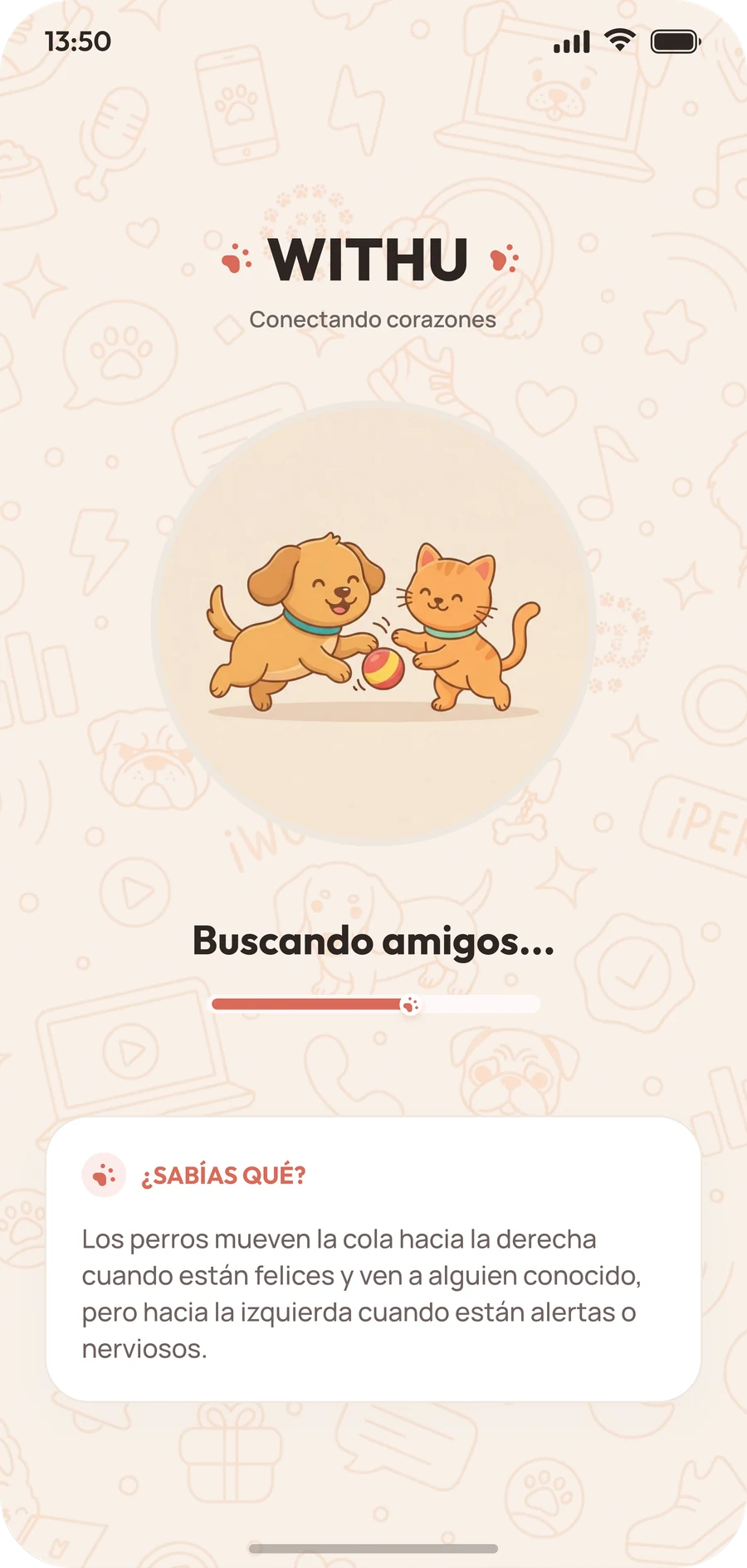
WITHU splash screen with the name, the tagline Conectando corazones, a dog and a cat playing, a loading bar and a did-you-know card
02

Adopta

Adopta

The animals looking for a home as photo cards with a name, an age and a status. Filter by type and save the ones you like with the heart.

Los animales que buscan hogar como tarjetas con foto, nombre, edad y estado. Filtra por tipo y guarda los que te gusten con el corazón.
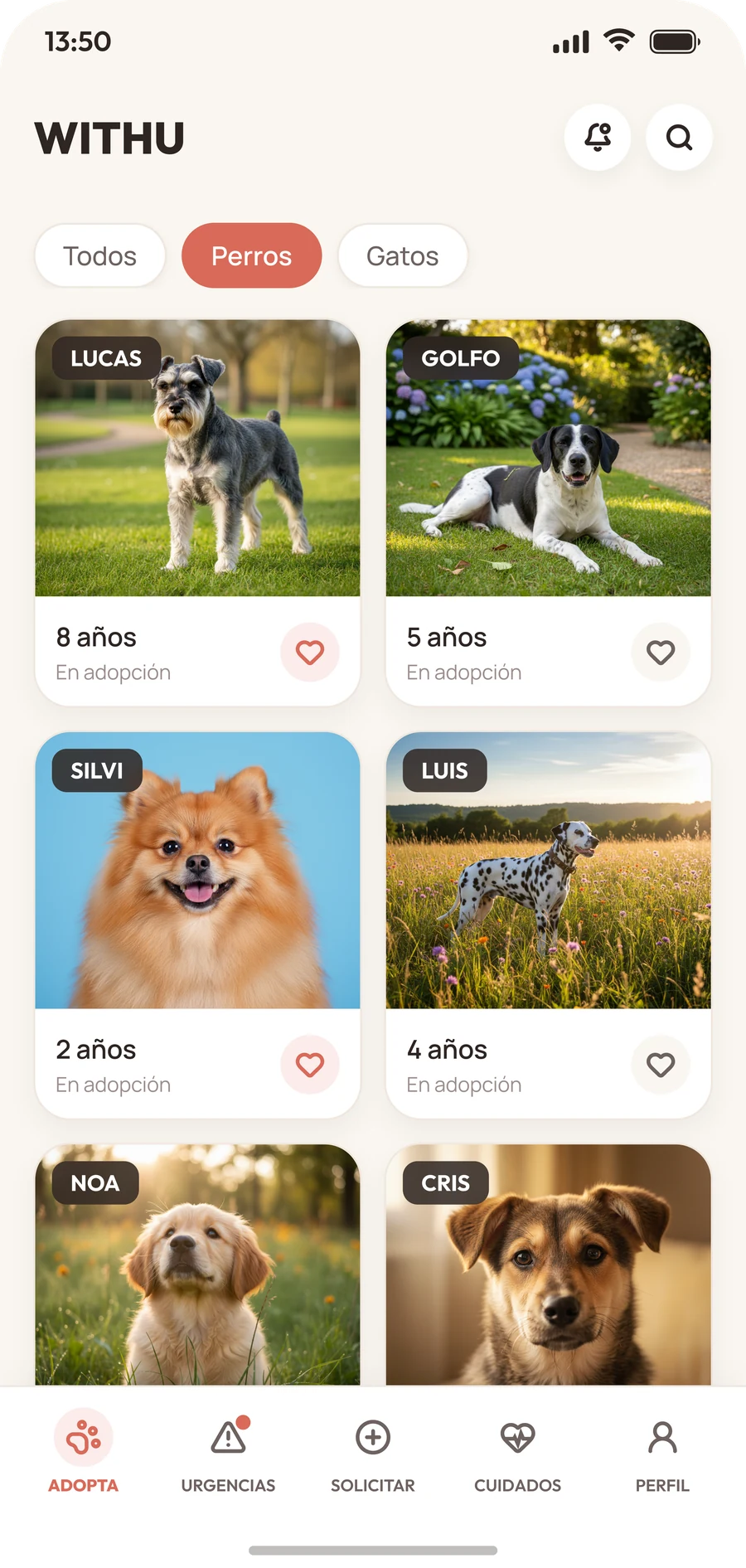
WITHU Adopta screen with Todos, Perros and Gatos filters and photo cards of six dogs
03

Pet profile

Ficha del animal

A photo you can swipe, the age and the city, a message button and four quick facts, then a short story and the button to apply.

Una foto que se desliza, la edad y la ciudad, un botón de mensaje y cuatro datos rápidos, y después una historia corta y el botón para solicitar.
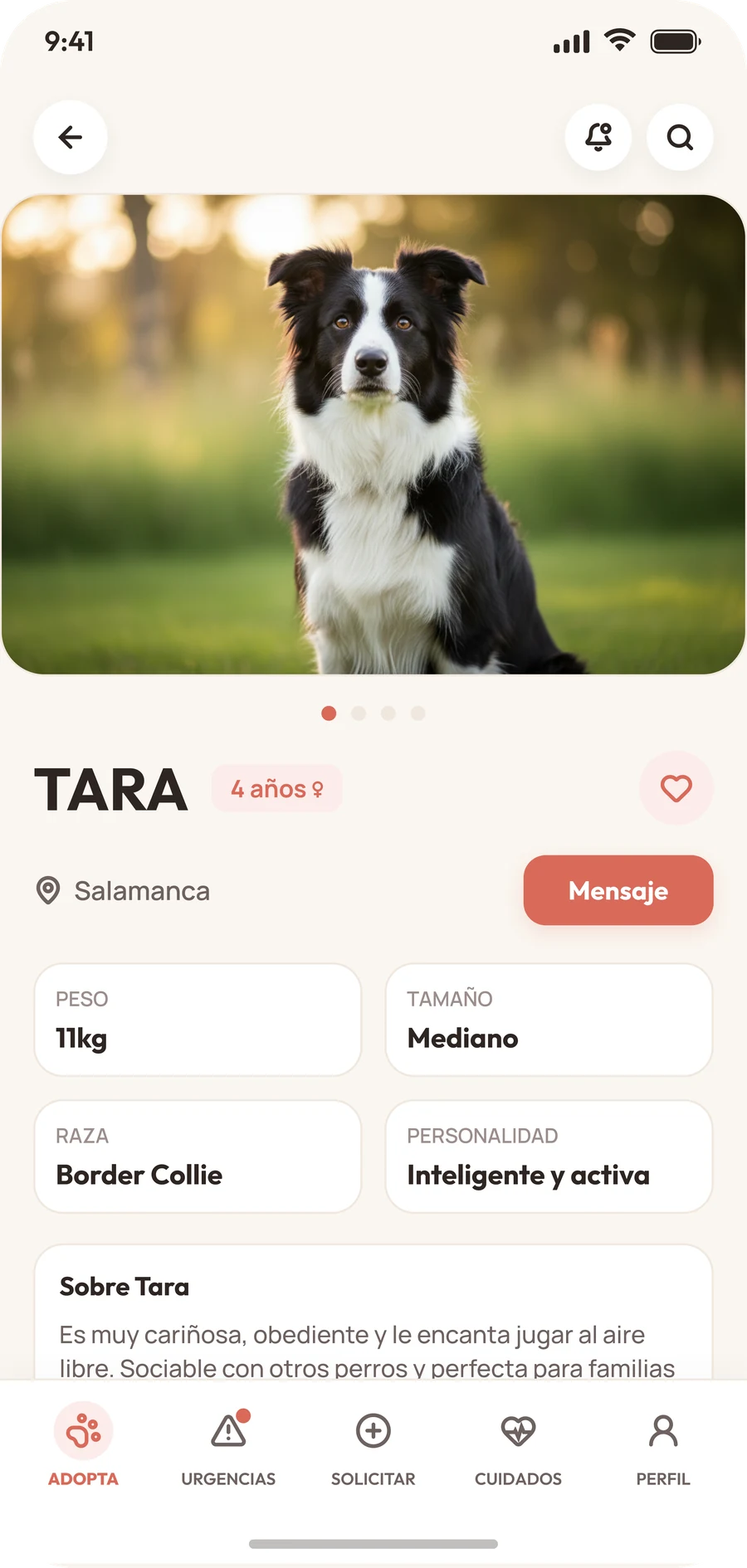
WITHU profile of Tara, a four-year-old Border Collie, with her weight, size, breed, personality and a message button
04

Urgent

Urgencias

The cases that cannot wait, with a red or amber tag, the story behind each one and a link to the full profile.

Los casos que no pueden esperar, con una etiqueta roja o ámbar, la historia de cada uno y un enlace a su ficha completa.
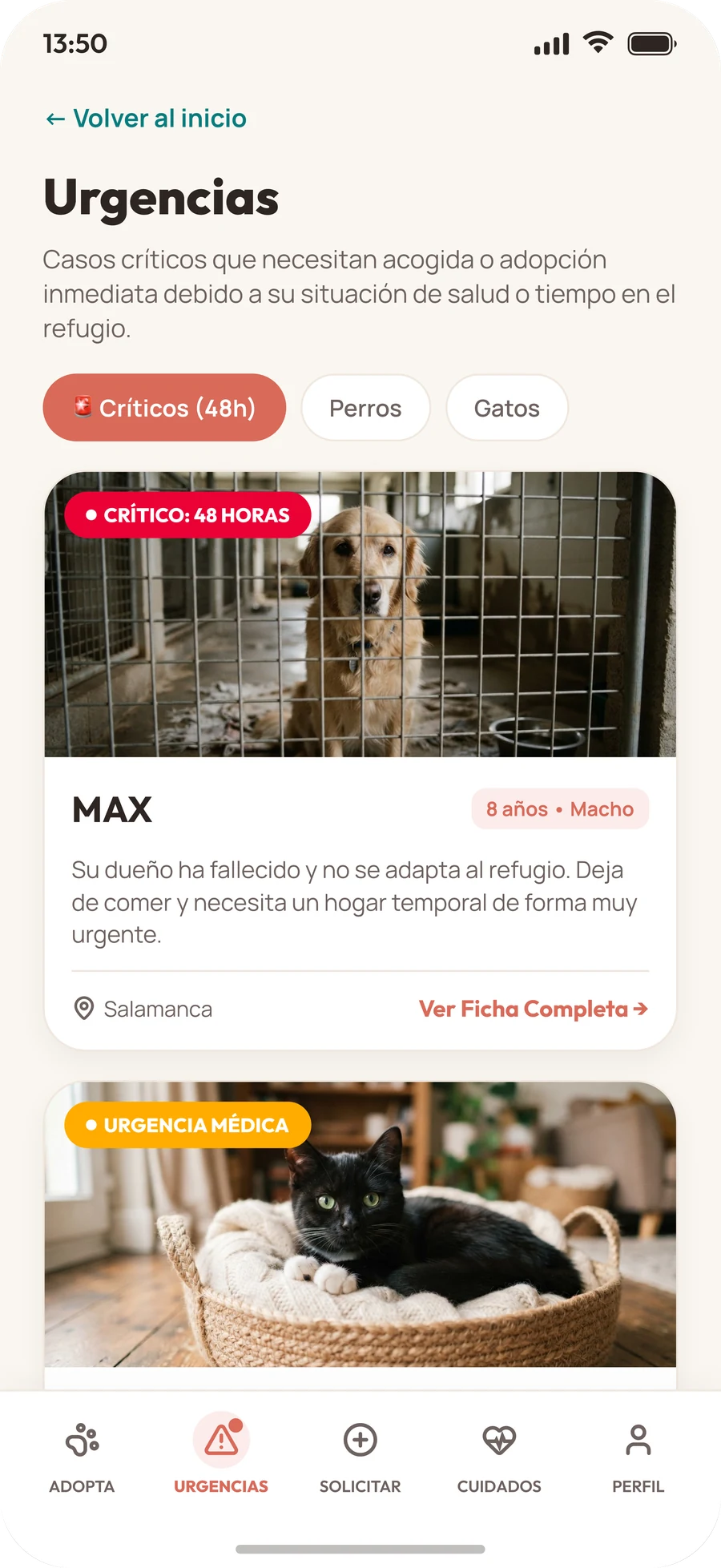
WITHU Urgent screen with a red critical tag on Max and an amber medical emergency tag on a cat
05

Apply · Step 1

Solicitar · Paso 1

Choose the animal: search, filter, and pick a card. The progress bar starts at a third.

Elegir el animal: busca, filtra y elige una tarjeta. La barra de progreso empieza en un tercio.
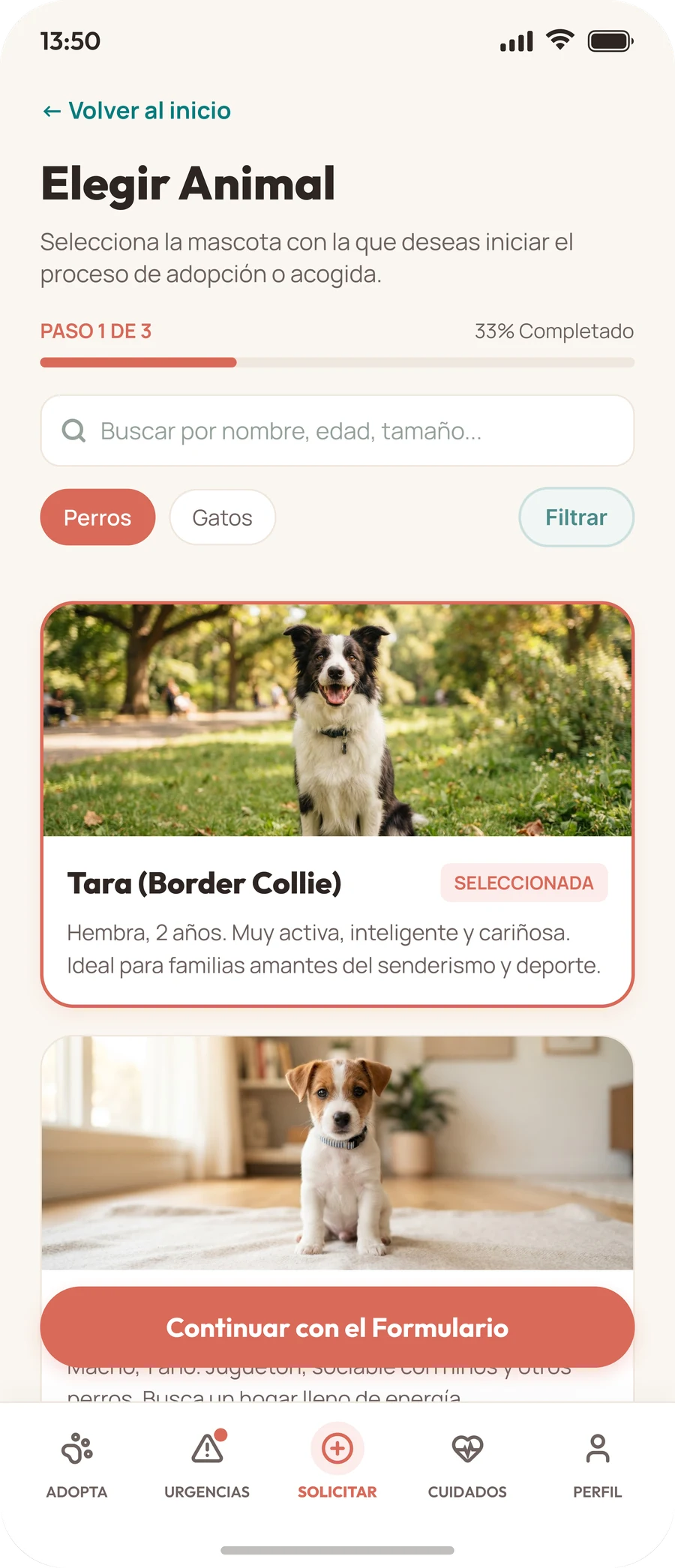
WITHU application step 1 of 3, choose an animal, with a search field, filters and a selected card for Tara
06

Apply · Step 2

Solicitar · Paso 2

A short form about your home and routine: hours alone, type of home and earlier experience, plus the terms.

Un formulario corto sobre tu casa y tu rutina: horas a solas, tipo de vivienda y experiencia previa, más los términos.
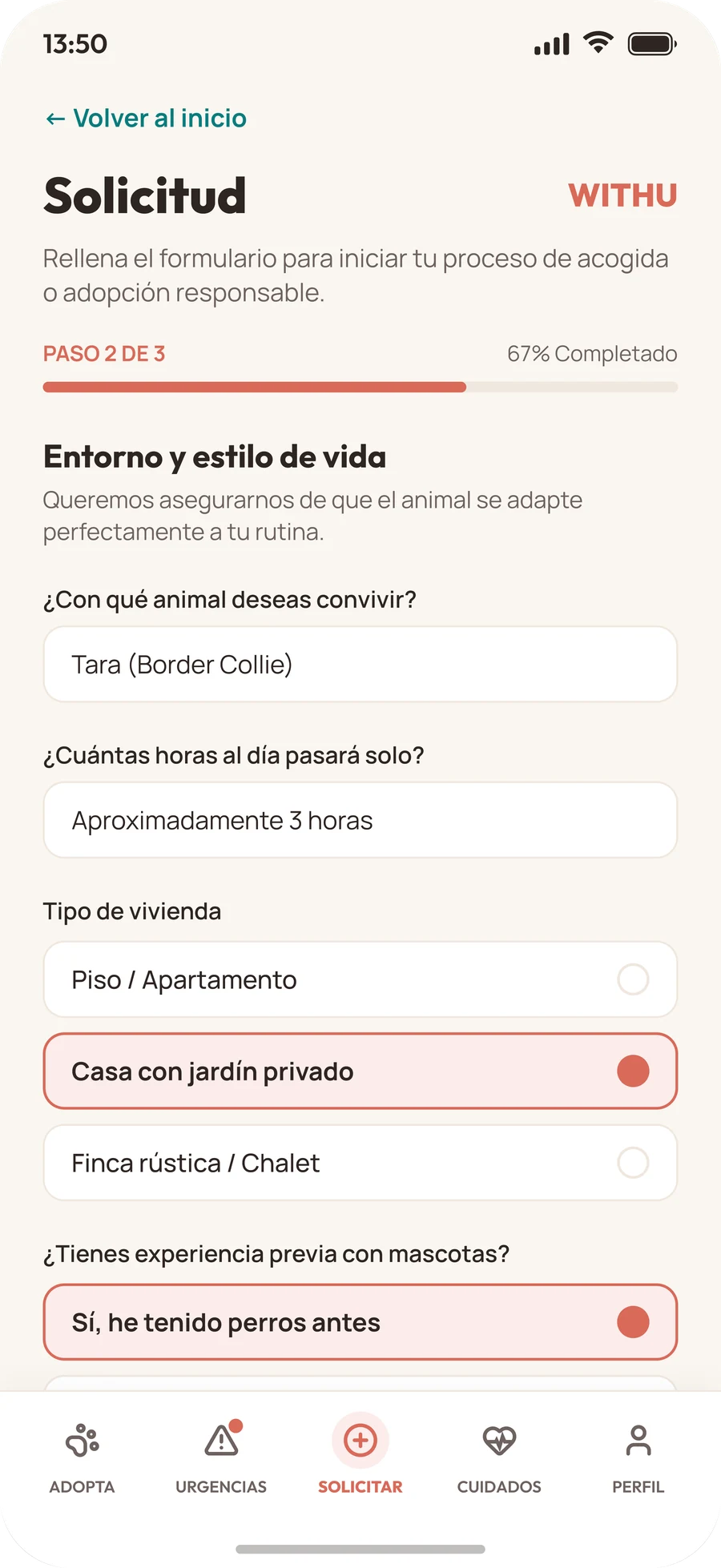
WITHU application step 2 of 3, home and lifestyle, with questions about hours alone, type of home and experience
07

Apply · Step 3

Solicitar · Paso 3

Upload the documents that check the home is suitable, confirm that everything is true and send the application.

Sube los documentos que comprueban que el hogar es adecuado, confirma que todo es verídico y envía la solicitud.
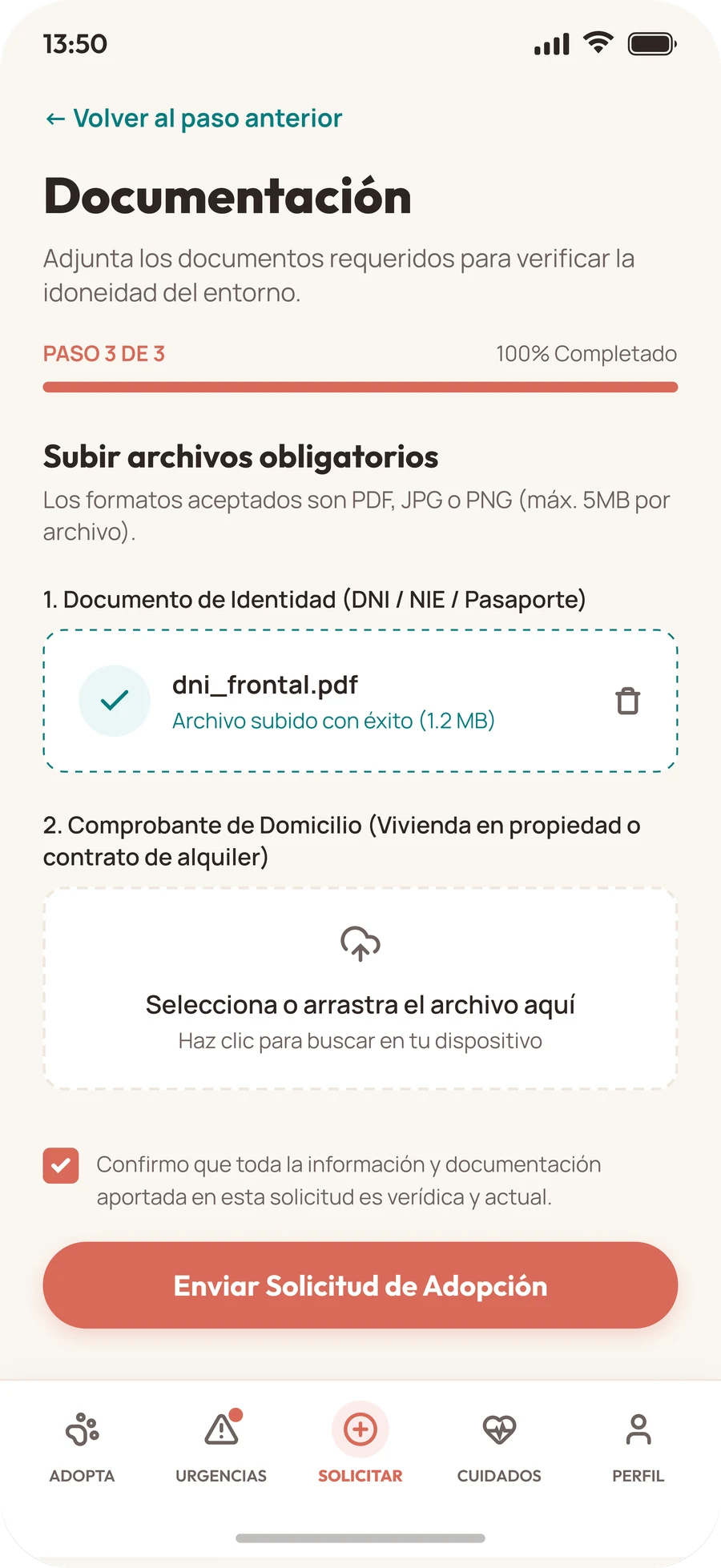

WITHU application step 3 of 3, documents, with one file uploaded, one empty upload box and the send button
    04

    Try it

    Pruébalo

    This is a working rebuild of the app, not a video. Browse the animals, save a few, open a profile and send an application with your own files.

    Es una reconstrucción funcional de la app, no un vídeo. Mira los animales, guarda algunos, abre una ficha y envía una solicitud con tus propios archivos.

    Things to try

    Qué puedes probar

    • Wait a moment on the splash, or tap it to skip. In Adopta, switch between dogs and cats, search by name or size and tap the hearts to save favourites.
    • Open a profile, swipe the photo, tap Message to write to the shelter, then apply to adopt.
    • Go through the three steps. Pick an animal (filter by size or urgent only), leave a field empty to see the errors, then upload a PDF, JPG or PNG up to 5 MB. Your file stays on your device.
    • In Urgent, switch to cats and open the full profile of Max or Luna.
    • In Care, tick off the first-week tasks and open a guide. In Profile, see your favourites and applications and switch the language. English and Spanish change this page too.
    • Espera un momento en la bienvenida o tócala para saltarla. En Adopta, cambia entre perros y gatos, busca por nombre o tamaño y toca los corazones para guardar favoritos.
    • Abre una ficha, desliza la foto, toca Mensaje para escribir a la protectora y después solicita la adopción.
    • Recorre los tres pasos. Elige un animal (filtra por tamaño o solo urgentes), deja un campo vacío para ver los errores y sube un PDF, JPG o PNG de hasta 5 MB. Tu archivo se queda en tu dispositivo.
    • En Urgencias, cambia a gatos y abre la ficha completa de Max o de Luna.
    • En Cuidados, marca las tareas de la primera semana y abre una guía. En Perfil, mira tus favoritos y solicitudes y cambia el idioma. Español e inglés cambian también esta página.

    Sample data only. Nothing is saved or sent.

    Solo datos de ejemplo. No se guarda ni se envía nada.

    Open full screenAbrir a pantalla completa
    05

    Design system

    Sistema de diseño

    A warm, friendly look: one coral on a cream background, a teal for links and documents, two typefaces, and red and amber kept for urgent cases.

    Un aspecto cálido y cercano: un coral sobre un fondo crema, un verde azulado para enlaces y documentos, dos tipografías, y el rojo y el ámbar reservados para los casos urgentes.

    Colour

    Color

    Coral carries the brand and every main action. Cream keeps the screens soft, teal marks links and uploaded documents, and text uses three tints of a warm near-black.

    El coral lleva la marca y todas las acciones principales. El crema mantiene las pantallas suaves, el verde azulado marca enlaces y documentos subidos, y el texto usa tres tonos de un casi negro cálido.

    Aa
    Coral#D96A59Primary. Main button, selected filter, hearts, progress bar and the active tab icon.Principal. Botón principal, filtro seleccionado, corazones, barra de progreso e icono de la pestaña activa.
    Aa
    Coral tint#FBECEBSoft fill for the selected card or option, the active tab pill and age badges.Relleno suave de la tarjeta u opción seleccionada, la píldora de la pestaña activa y las etiquetas de edad.
    Aa
    Cream#FAF6F0App background. Cards sit on it in white.Fondo de la app. Las tarjetas se apoyan en él en blanco.
    Aa
    Teal#087C7EBack links, “see full profile” and the outline of an uploaded file. Its tint is #EBF7F7.Enlaces de volver, «ver ficha completa» y el borde de un archivo subido. Su tono suave es #EBF7F7.
    Aa
    Deep coral#AD4837Added by me. Coral is too light for small text, so this darker one is used for text on the tint and for the avatar.Lo añadí yo. El coral es demasiado claro para texto pequeño, así que este más oscuro se usa para el texto sobre el tono suave y para el avatar.
    Ink#2E2522Titles and primary textTítulos y texto principal
    Mute#6E625FSecondary textTexto secundario
    Soft#9C8E8BStatus line, placeholdersLínea de estado y textos de ayuda
    Line#F0E7DEHairlines and card bordersLíneas finas y bordes
    Red#EB0035Critical: 48 hoursCrítico: 48 horas
    Amber#FFAC00Medical emergencyUrgencia médica
    Name tag#382E26Name label on photosEtiqueta de nombre sobre las fotos
    • 13.9:1 Ink · Cream
    • 5.5:1 Mute · Cream
    • 5.6:1 White · Deep coral
    • 4.9:1 Deep coral · Tint
    • 4.6:1 Teal · Cream
    • 4.6:1 White · Red
    • 3.4:1 White · Coral
    • 3.2:1 Coral · Cream
    • 2.9:1 Soft · Cream
    • 1.9:1 White · Amber

    ✓ meets WCAG AA for text (4.5:1). ! is below it. White on coral is the main button and the selected filter, white on amber is the medical-emergency tag, and Soft is the “up for adoption” line. All of them are on the list of next steps.

    ✓ cumple WCAG AA para texto (4,5:1). ! queda por debajo. Blanco sobre coral es el botón principal y el filtro seleccionado, blanco sobre ámbar es la etiqueta de urgencia médica y Soft es la línea de «en adopción». Todos están en la lista de próximos pasos.

    Urgency tags

    Etiquetas de urgencia

    Two colours tell urgency apart before you read a word. They sit on the photo, in the top-left corner, on the pet’s profile and in the Urgent tab.

    Dos colores distinguen la urgencia antes de leer una palabra. Van sobre la foto, en la esquina superior izquierda, en la ficha del animal y en la pestaña Urgencias.

    Critical: 48 hoursCrítico: 48 horasRed is only for animals that need a home within two days.El rojo es solo para animales que necesitan un hogar en dos días.
    Medical emergencyUrgencia médicaAmber is for animals recovering from an illness or an injury.El ámbar es para animales que se recuperan de una enfermedad o una herida.
    LucasThe name label on a photo in the Adopta list, dark so a white name reads on any picture.La etiqueta de nombre sobre una foto en la lista de Adopta, oscura para que el nombre en blanco se lea sobre cualquier imagen.

    Typography

    Tipografía

    Outfit for titles, buttons, tags and tab labels, and Manrope for reading text. Sample text is in Spanish, as in the screens.

    Outfit para títulos, botones, etiquetas y pestañas, y Manrope para el texto de lectura. Los textos de ejemplo están en español, como en las pantallas.

    Outfit+ Manrope
    Outfit 500 · 600 · 700 · 800Manrope 400 · 500 · 600
    Splash title50 / 800
    Título de bienvenida50 / 800
    WITHU
    Screen title31 / 800
    Título de pantalla31 / 800
    Urgencias
    Section title19 / 700
    Título de sección19 / 700
    Entorno y estilo de vida
    Card title17 / 700
    Título de tarjeta17 / 700
    Tara (Border Collie)
    Button16 / 700
    Botón16 / 700
    Solicitar adopción
    Body14.5 / 400
    Texto14,5 / 400
    Es muy cariñosa, obediente y le encanta jugar al aire libre.
    Tab label10 / 600
    Pestaña10 / 600
    Urgencias

    Shape and spacing

    Forma y espaciado

    Everything is rounded, and the bigger the container, the rounder the corner. Screens are 402 px wide with a 20 px side margin.

    Todo es redondeado y, cuanto más grande el contenedor, más redondeada la esquina. Las pantallas miden 402 px de ancho con un margen lateral de 20 px.

    Corner radius

    Radio de esquina

    26Bottom sheetHoja inferior
    22Animal cardTarjeta de animal
    18Info boxesCajas de datos
    14Fields, optionsCampos, opciones
    9Name labelEtiqueta de nombre
    PillButton, filters
    PíldoraBotón, filtros

    Spacing

    Espaciado

    • 20Screen side marginMargen lateral de pantalla
    • 16Card paddingRelleno de tarjeta
    • 12Gap between itemsEspacio entre elementos
    • 8Inner gapEspacio interior

    Components

    Componentes

    These are live HTML, built from the same values as the app.

    Son HTML real, construido con los mismos valores que la app.

    Filter chips

    Filtros

    TodosPerrosGatos

    Pill-shaped filters for the type of animal. Coral when selected, white with a line when not.

    Filtros en forma de píldora para el tipo de animal. Coral al seleccionar, blanco con línea si no.

    Animal card

    Tarjeta de animal

    Lucas
    8 añosEn adopción

    A big photo with the name on it, then the age, the status and a heart to save it.

    Una foto grande con el nombre encima, y debajo la edad, el estado y un corazón para guardarlo.

    Main button

    Botón principal

    Solicitar adopción

    One full-width pill for the one thing the app is for: starting an adoption.

    Una píldora de ancho completo para lo único para lo que sirve la app: empezar una adopción.

    Step and progress

    Paso y progreso

    Paso 2 de 367% Completado

    The application has three steps, and a bar shows how far along you are.

    La solicitud tiene tres pasos y una barra muestra cuánto llevas.

    Options

    Opciones

    Piso / Apartamento
    Casa con jardín privado

    Full-width rows for choosing one answer. The chosen one gets the tint, a coral border and a dot.

    Filas de ancho completo para elegir una respuesta. La elegida recibe el tono suave, un borde coral y un punto.

    Document upload

    Subida de documentos

    dni_frontal.pdfFile uploaded (1.2 MB)Archivo subido con éxito (1,2 MB)
    Select or drag the file hereSelecciona o arrastra el archivo aquí

    Teal and dashed once a file is in, grey and dashed while it is empty. Errors turn the box red and say what to fix.

    Verde azulado y discontinuo cuando ya hay un archivo, gris y discontinuo mientras está vacío. Los errores ponen la caja en rojo y dicen qué corregir.

    Tab bar

    Barra de pestañas

    Adopta Urgencias Solicitar Cuidados Perfil

    Five tabs, one for each part of the adoption journey. The active one gets a tint pill and a darker label.

    Cinco pestañas, una por cada parte del recorrido de adopción. La activa recibe una píldora suave y una etiqueta más oscura.

    Design principles

    Principios de diseño

    • The animal comes firstEl animal, lo primeroBig photos lead every list and every profile. The interface stays quiet around them: cream, white and one coral.Las fotos grandes encabezan cada lista y cada ficha. La interfaz se mantiene tranquila alrededor: crema, blanco y un solo coral.
    • Urgency is told by colourLa urgencia se ve por el colorRed and amber are used for urgent cases only, so when you see them you know something needs attention.El rojo y el ámbar se usan solo en casos urgentes, así que cuando los ves sabes que algo necesita atención.
    • A long process in small stepsUn proceso largo en pasos pequeñosApplying takes three short steps with a progress bar, a clear way back and errors that say what is missing.Solicitar lleva tres pasos cortos con barra de progreso, una vuelta atrás clara y errores que dicen qué falta.
    06

    What this is, and what it is not

    Qué es esto y qué no es

    Scope and limits

    Alcance y límites

    • The prototype rebuilds the app from the Figma screens: splash, Adopta, a pet’s profile, Urgent and the three steps of the application.
    • The design shows a tab for Care and one for Profile, but not their screens. I made both, along with the other animals’ profiles, messages, notifications, the filter sheet, the “application sent” screen, favourites and applications lists, and the language and about sheets, so every button leads somewhere. The care guides, the first-week checklist, the notification texts and the profile are my own sample content.
    • Names, ages, cities and the texts of Tara, Pedro, Max and Luna come from the design. The breeds, weights, sizes and descriptions of the other animals are mine. The Cats filter has no animals in the design, so I added a “more cats coming soon” note.
    • The photos come from the design. The name labels that were baked into them were retouched out, so the app can draw them live. Nothing is sent when you apply, uploaded files never leave your device, and the ID file already attached in step 3 is a placeholder name.
    • The colours, type sizes, radii and spacing in the design system were taken from the final screens. The names and roles are my description of how the app uses them. Deep coral is the one colour I added.
    • The page and the app work in English and Spanish. The design is in Spanish, and the English texts are my translation.
    • El prototipo reconstruye la app a partir de las pantallas de Figma: bienvenida, Adopta, la ficha de un animal, Urgencias y los tres pasos de la solicitud.
    • El diseño muestra una pestaña de Cuidados y otra de Perfil, pero no sus pantallas. Hice las dos, además de las fichas de los demás animales, los mensajes, las notificaciones, la hoja de filtros, la pantalla de «solicitud enviada», las listas de favoritos y solicitudes y las hojas de idioma y «acerca de», para que cada botón lleve a algún sitio. Las guías de cuidados, la lista de la primera semana, los textos de las notificaciones y el perfil son contenido de ejemplo mío.
    • Los nombres, las edades, las ciudades y los textos de Tara, Pedro, Max y Luna vienen del diseño. Las razas, los pesos, los tamaños y las descripciones de los demás animales son míos. El filtro de Gatos no tiene animales en el diseño, así que añadí un aviso de «pronto habrá más gatos».
    • Las fotos vienen del diseño. Retoqué las etiquetas de nombre que llevaban incrustadas para que la app las dibuje en vivo. Al solicitar no se envía nada, los archivos que subes no salen de tu dispositivo y el DNI ya adjunto en el paso 3 es solo un nombre de ejemplo.
    • Los colores, tamaños de letra, radios y espaciados del sistema de diseño se tomaron de las pantallas finales. Los nombres y los roles son mi descripción de cómo los usa la app. El coral oscuro es el único color que añadí.
    • La página y la app funcionan en inglés y en español. El diseño está en español y los textos en inglés son mi traducción.

    Next steps

    Próximos pasos

    • Raise the contrast of white text on coral (3.4:1) and on amber (1.9:1), for example with a darker coral on buttons and dark text on the amber tag.
    • Test the three-step application with real adopters and a shelter, and look at where people drop off.
    • Replace the sample animals with the real data and photos of a shelter.
    • Make the prototype remember favourites and applications between visits.
    • Subir el contraste del texto blanco sobre coral (3,4:1) y sobre ámbar (1,9:1), por ejemplo con un coral más oscuro en los botones y texto oscuro en la etiqueta ámbar.
    • Probar la solicitud de tres pasos con adoptantes reales y una protectora, y ver dónde abandona la gente.
    • Sustituir los animales de ejemplo por los datos y las fotos reales de una protectora.
    • Hacer que el prototipo recuerde entre visitas los favoritos y las solicitudes.