Laura Criado
Case study · MobileCaso de estudio · Móvil

Rootine

Streamlining indoor flora management through adaptive notifications and guided care routines designed to minimize user drop-off.

Simplificando el cuidado de las plantas de interior con notificaciones adaptativas y rutinas de cuidado guiadas, pensadas para reducir el abandono.
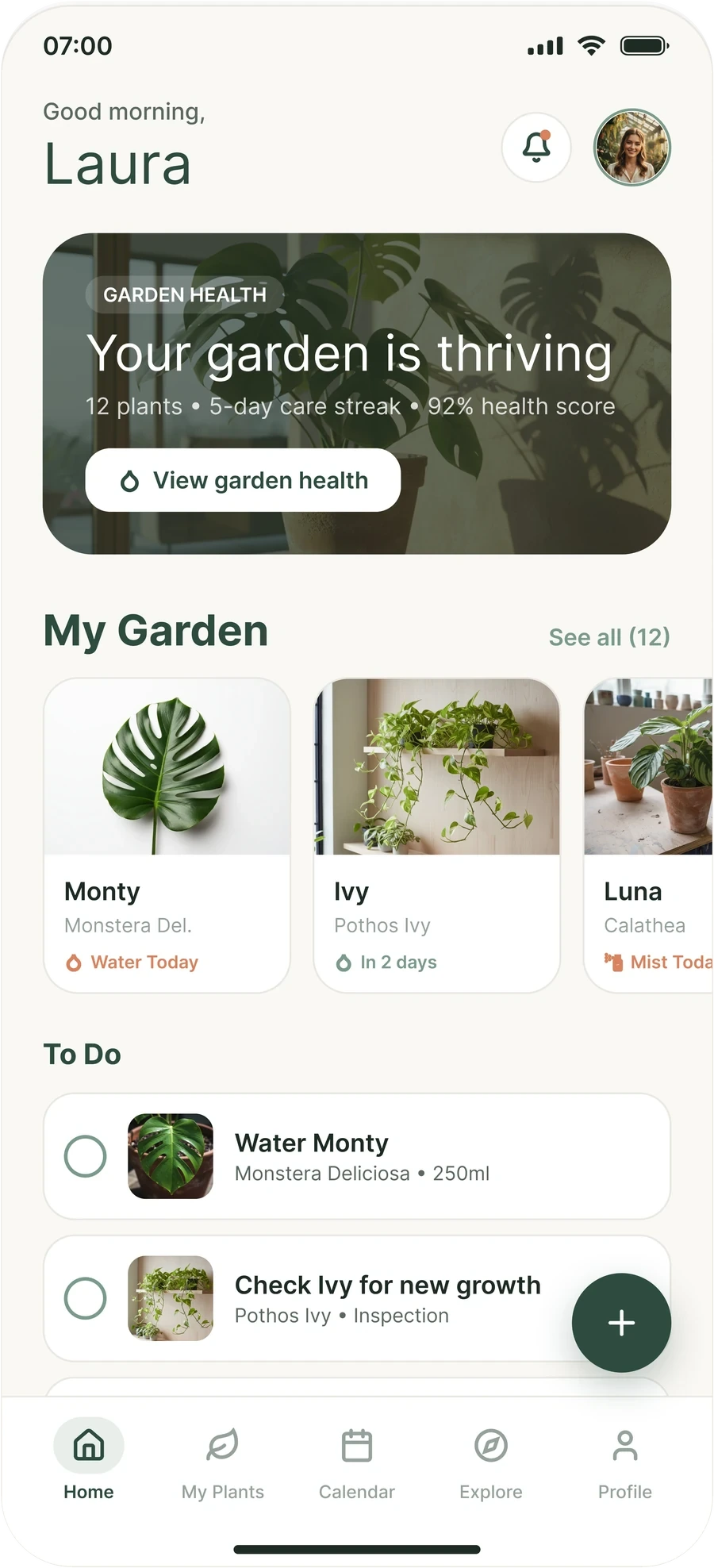
Rootine home screen: garden health summary, the garden carousel and today’s to-do list
Team
Equipo
1 designer
1 diseñadora
Deliverable
Entregable
iOS/Android app + design system
App iOS/Android + sistema de diseño
My role
Mi rol
UX Research · Product Design
UX Research · Diseño de producto
Platform
Plataforma
iOS · Android
Duration
Duración
5 weeks
5 semanas
Tools
Herramientas
Figma · Miro
01

Overview

Resumen

Rootine grew out of a very specific problem: most plant care apps assume users already know what their plant needs. In practice, the lack of context leads to drop-off within the first few weeks.

My work covered the full process: user interviews, information architecture design, wireframes, high-fidelity prototyping, and usability testing with 8 participants before launch.

Rootine nació de un problema muy concreto: la mayoría de las apps de cuidado de plantas asumen que quien las usa ya sabe lo que necesita su planta. En la práctica, esa falta de contexto provoca abandono en las primeras semanas.

Mi trabajo cubrió todo el proceso: entrevistas con usuarios, diseño de la arquitectura de información, wireframes, prototipado de alta fidelidad y tests de usabilidad con 8 participantes antes del lanzamiento.

The challengeEl reto

Reducing drop-off and uncertainty when caring for our own plants

Reducir el abandono y la incertidumbre al cuidar nuestras propias plantas

  • User interviews
  • Entrevistas a usuarios
  • Information architecture
  • Arquitectura de información
  • Wireframes
  • Wireframes
  • High-fidelity prototype
  • Prototipo de alta fidelidad
  • Usability testing · 8 participants
  • Tests de usabilidad · 8 participantes
  • Design system
  • Sistema de diseño
02

From research to prototype

De la investigación al prototipo

I structured the project into four phases, validating each one with real users to reduce risk before moving into development.

Estructuré el proyecto en cuatro fases y validé cada una con usuarios reales para reducir riesgos antes de pasar a desarrollo.

01

Research

Investigación

Interviews with 8 users and competitive app analysis to identify drop-off patterns.

Entrevistas con 8 usuarios y análisis de apps competidoras para identificar patrones de abandono.

02

Architecture

Arquitectura

Defining the onboarding flow and adaptive notification hierarchy.

Definición del flujo de onboarding y de la jerarquía de notificaciones adaptativas.

03

Prototyping

Prototipado

Low-fidelity wireframes evolved into a navigable Figma prototype.

Wireframes de baja fidelidad que evolucionaron hasta un prototipo navegable en Figma.

04

Testing

Testeo

8 usability sessions to validate the flow before final development.

8 sesiones de usabilidad para validar el flujo antes del desarrollo final.

5weekssemanas
4phasesfases
8user interviewsentrevistas a usuarios
8usability sessionssesiones de usabilidad
03

Design system

Sistema de diseño

A calm, natural look: forest greens on warm cream, one typeface, soft shapes, and a single warm colour reserved for what needs care right now.

Un aspecto tranquilo y natural: verdes de bosque sobre crema cálido, una sola tipografía, formas suaves y un único color cálido reservado para lo que necesita cuidado ahora mismo.

Colour

Color

Two greens carry the brand, cream keeps it warm, and text uses three tints of the same dark green.

Dos verdes llevan la marca, el crema la mantiene cálida y el texto usa tres tonos del mismo verde oscuro.

Aa
Forest#2D4B3EPrimary. Titles, hero card, buttons, floating button, active tab.Principal. Títulos, tarjeta destacada, botones, botón flotante, pestaña activa.
Aa
Sage#7A9A8BSecondary. Healthy state, checkboxes, links and icons.Secundario. Estado sano, casillas, enlaces e iconos.
Aa
Mist#E8EFEAActive tab background and soft fills.Fondo de la pestaña activa y rellenos suaves.
Aa
Cream#FAF8F5App background.Fondo de la app.
Ink#1E2B24Primary textTexto principal
Mute#5A6860Secondary textTexto secundario
Soft#95A29BCaptions and metadataPies y metadatos
Line#EAE7E2Hairlines and card bordersLíneas finas y bordes
Chip#F2F6F3Tag backgroundFondo de las etiquetas
  • 9.1:1 Forest · Cream
  • 13.9:1 Ink · Cream
  • 5.5:1 Mute · Cream
  • 9.6:1 White · Forest
  • 2.5:1 Soft · Cream
  • 2.9:1 Sage · Cream

✓ meets WCAG AA for text (4.5:1). ! is below it: those tints are used for icons, dots and secondary captions.

✓ cumple WCAG AA para texto (4,5:1). ! queda por debajo: esos tonos se usan en iconos, puntos y textos secundarios.

Plant status

Estado de la planta

Each plant shows a small dot. Green is fine, amber is coming up, terracotta is now. It is the only place the warm colours appear.

Cada planta muestra un pequeño punto. Verde es que todo va bien, ámbar que se acerca y terracota que es ahora. Es el único sitio donde aparecen los colores cálidos.

HealthySana#7A9A8B · Sage
Needs water soonPronto necesita agua#FFAC00 · Amber
Needs water nowNecesita agua ya#D9825E · Terracotta

Typography

Tipografía

Inter throughout. Hierarchy comes from size and weight, never from a second typeface.

Inter en toda la app. La jerarquía viene del tamaño y el peso, nunca de una segunda tipografía.

Inter
Regular 400Medium 500Semibold 600Bold 700
Greeting32 / 400
Good morningBuenos días
Hero title28 / 400
Título destacado28 / 400
Your garden is thrivingTu jardín está radiante
Page title25 / 700
Título de página25 / 700
My PlantsMis plantas
Section title24 / 700
Título de sección24 / 700
My GardenMi jardín
Card title14 / 600
Título de tarjeta14 / 600
Monty
Body13 / 400–500
Texto13 / 400–500
Monstera Deliciosa · 250mlMonstera deliciosa · 250 ml
Caption10–11 / 500–600
Pie10–11 / 500–600
Garden healthSalud del jardín

Shape and spacing

Forma y espaciado

The bigger the container, the rounder the corner. Everything sits on a 4 px grid inside a 402 px wide screen.

Cuanto más grande el contenedor, más redondeada la esquina. Todo se apoya en una cuadrícula de 4 px dentro de una pantalla de 402 px de ancho.

Corner radius

Radio de esquina

28Hero cardTarjeta destacada
23Plant cardTarjeta de planta
20Garden cardTarjeta de jardín
18Task rowFila de tarea
15SearchBúsqueda
96PillsPíldoras

Spacing

Espaciado

  • 24Screen side marginMargen lateral de pantalla
  • 12Gap between cardsEspacio entre tarjetas
  • 8Inner gapEspacio interior
  • 4Base unitUnidad base

Components

Componentes

These are live HTML, built from the same values as the app.

Son HTML real, construido con los mismos valores que la app.

Filter pills

Filtros

AllTodasIndoorInteriorOutdoorExterior

96 px radius. Forest when selected, white with a hairline when not.

Radio de 96 px. Forest al seleccionar, blanco con línea fina si no.
Plant card

Tarjeta de planta

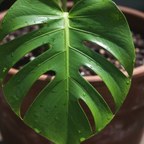
Monty
Monstera DeliciosaMonstera deliciosaIndoorInterior
Last watered 3 days agoRegada hace 3 días

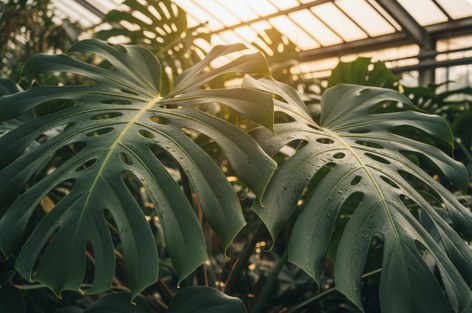
Photo first, then name and status dot, species, tag and last care.

Primero la foto, luego nombre y punto de estado, especie, etiqueta y último cuidado.
Task row

Fila de tarea

Water MontyRegar MontyMonstera Deliciosa • 250mlMonstera deliciosa • 250 ml

One tap to tick off. The photo helps you find the right plant at a glance.

Un toque para marcarla. La foto ayuda a reconocer la planta al instante.

Button and floating button

Botón y botón flotante

View garden healthVer salud del jardín

White on forest for the main action, a round forest button for adding a plant.

Blanco sobre forest para la acción principal y un botón redondo forest para añadir planta.

Tab bar

Barra de pestañas

HomeInicio PlantsPlantas CalendarCalendario ExploreExplorar ProfilePerfil

Five tabs. The active one sits on a mist pill and turns forest.

Cinco pestañas. La activa se apoya en una píldora mist y pasa a forest.

Design principles

Principios de diseño

  • One colour for “now”Un color para «ahora»Terracotta is kept for what needs water now. Everything else stays green, so urgency is never lost in decoration.La terracota se reserva para lo que necesita agua ahora. Todo lo demás es verde, así la urgencia nunca se pierde entre la decoración.
  • One typeface, weight does the workUna tipografía, el peso hace el trabajoInter only. Light, large greetings feel calm; bold titles give structure.Solo Inter. Los saludos grandes y ligeros transmiten calma; los títulos en negrita dan estructura.
  • Soft shapes, sized to contentFormas suaves, a la medida del contenidoCorners round more as containers grow, and pills mark anything you tap to filter.Las esquinas se redondean más cuanto mayor es el contenedor, y las píldoras marcan lo que se toca para filtrar.
04

Key screens

Pantallas clave

A reminder system that adapts to each plant species and the light available in the user’s home, rather than sending generic notifications.

Un sistema de recordatorios que se adapta a cada especie de planta y a la luz disponible en el hogar, en lugar de enviar notificaciones genéricas.

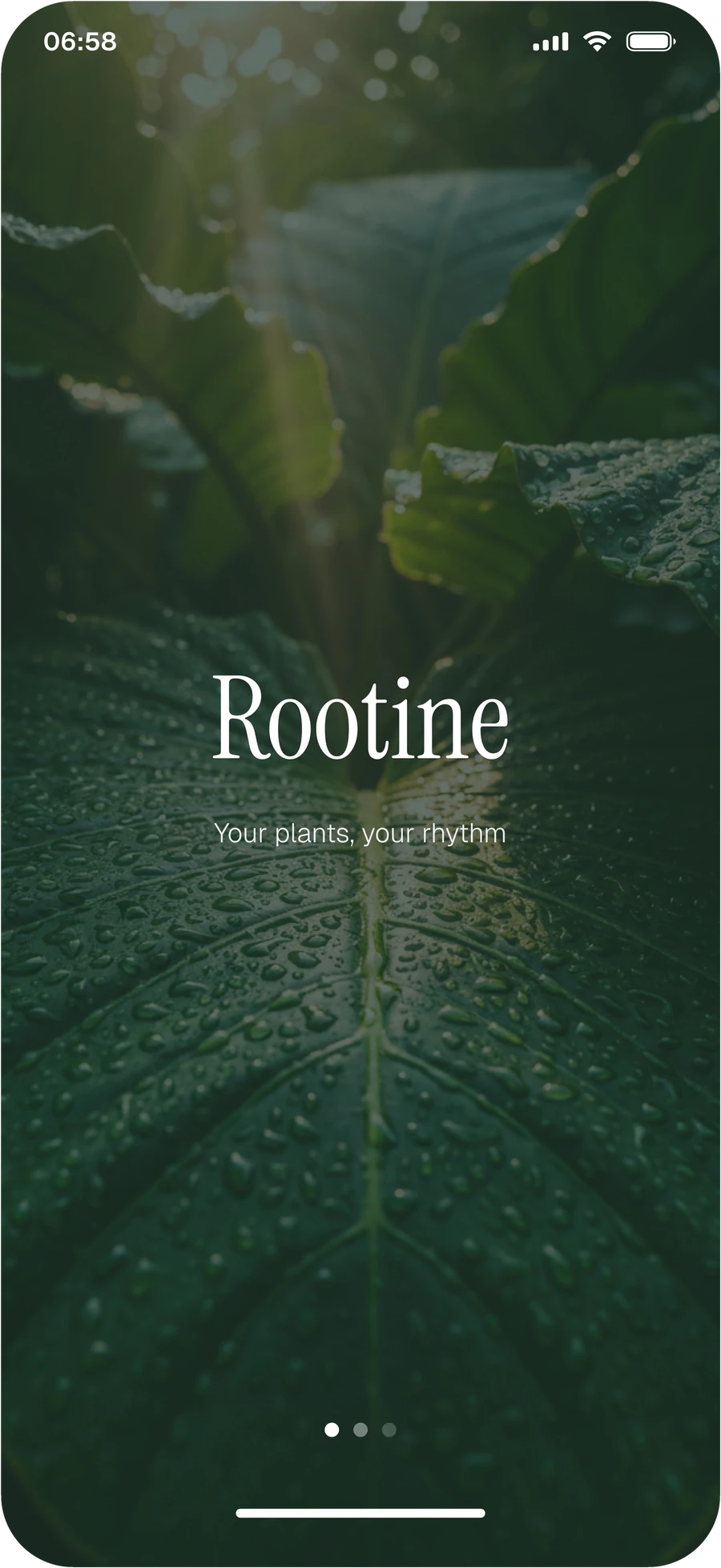
Rootine splash screen with the wordmark over a close-up of a wet leaf

Splash

Bienvenida

A calm first impression: the wordmark and the promise, “Your plants, your rhythm”.

Una primera impresión tranquila: la marca y su lema, «Your plants, your rhythm».

Rootine home screen with garden health, the garden carousel and a to-do list

Home

Inicio

Today at a glance: how the garden is doing, the plants of the day and a short to-do list.

El día de un vistazo: cómo va el jardín, las plantas de hoy y una lista corta de tareas.
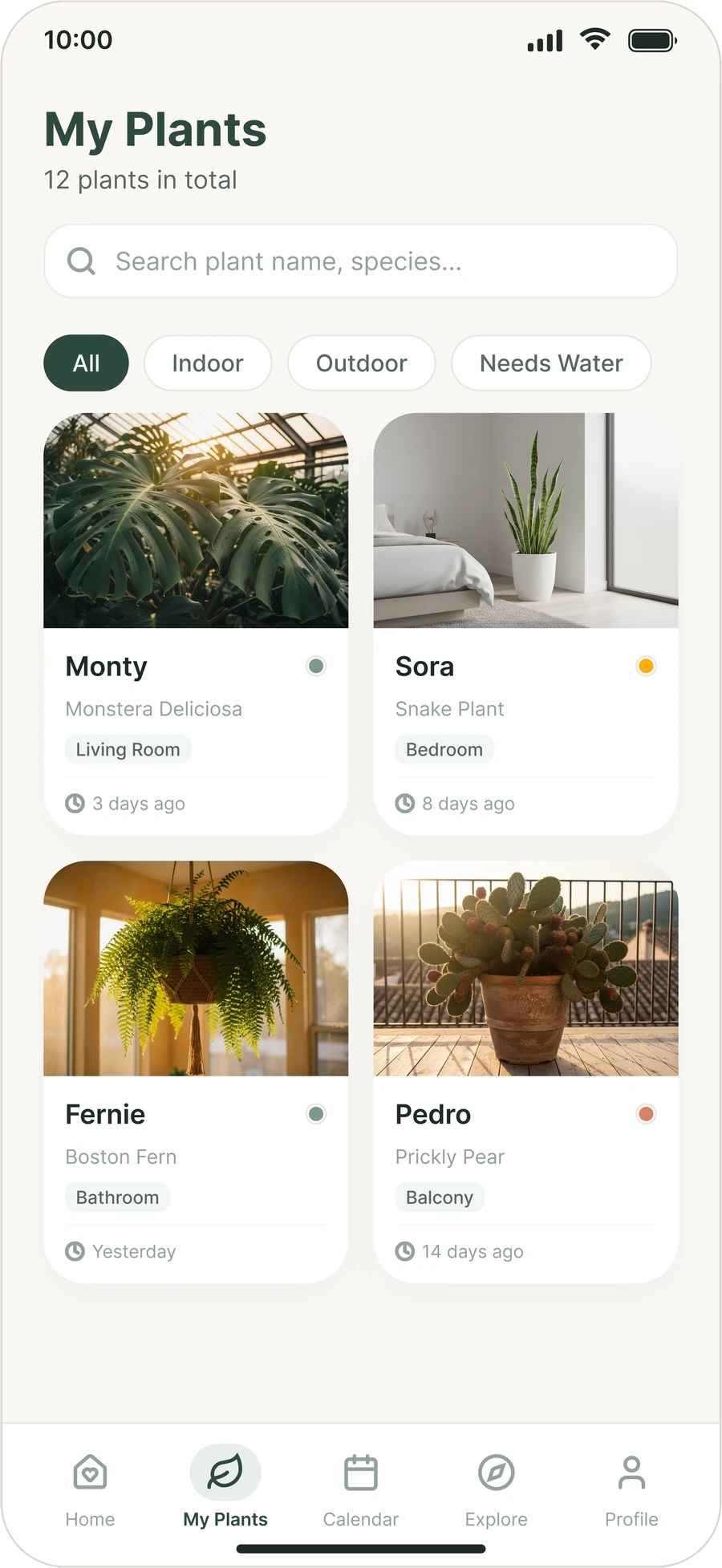
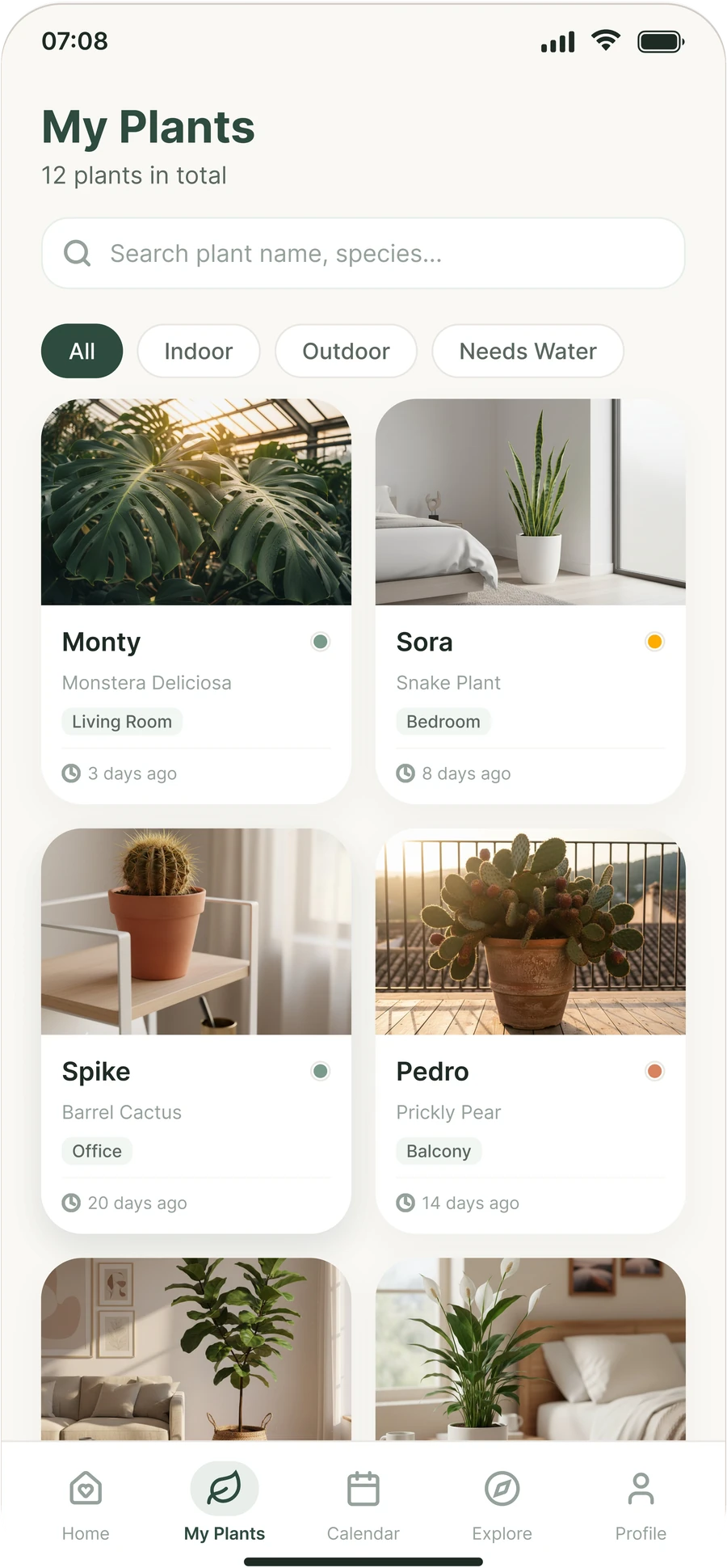
Rootine My Plants screen with search, filters and a grid of plant cards

My Plants

Mis plantas

The whole collection with search, filters, and a colour dot that shows each plant’s state next to when it was last watered.

Toda la colección con búsqueda, filtros y un punto de color que muestra el estado de cada planta junto a cuándo se regó por última vez.
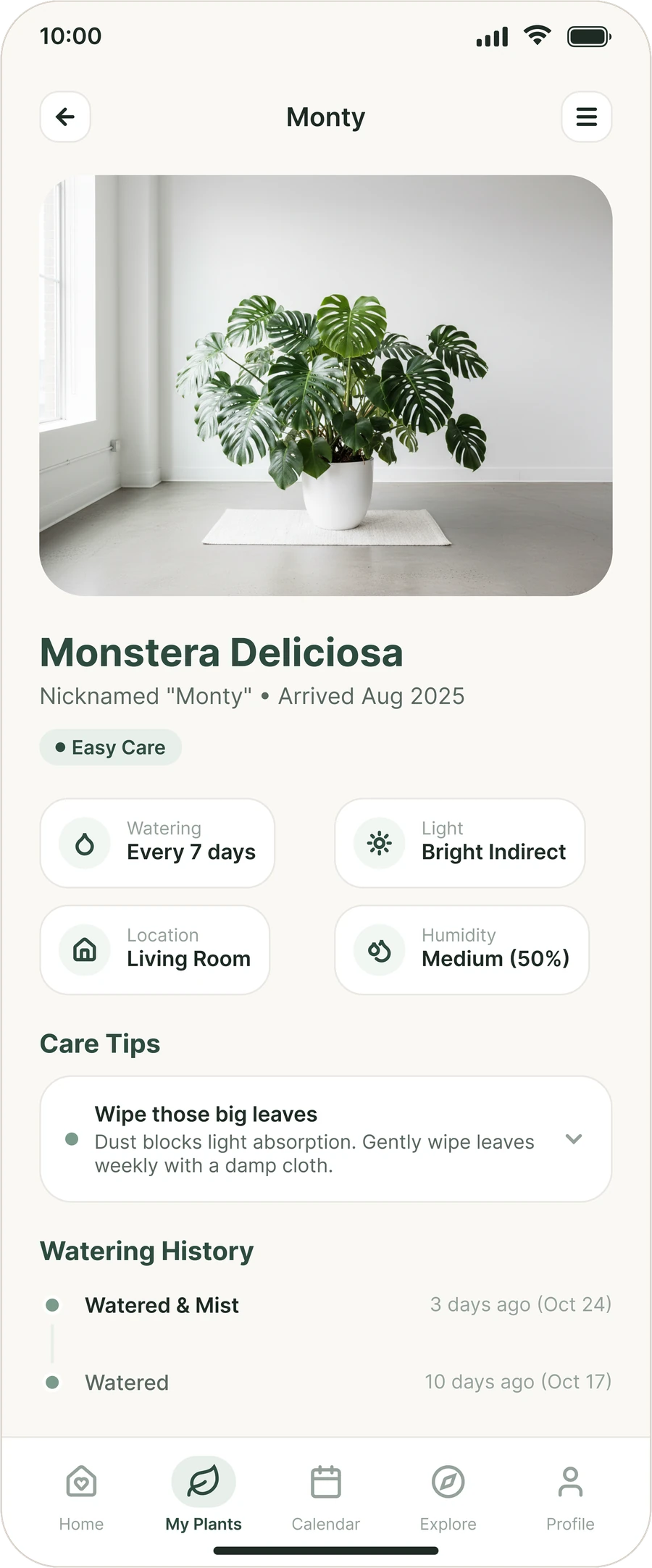
Rootine plant page for Monty the monstera, with care details, a care tip and the watering history

Plant page

Ficha de planta

Everything one plant needs: care level, watering, light, location and humidity, a care tip and its watering history.

Todo lo que necesita una planta: nivel de cuidado, riego, luz, ubicación y humedad, un consejo y su historial de riego.
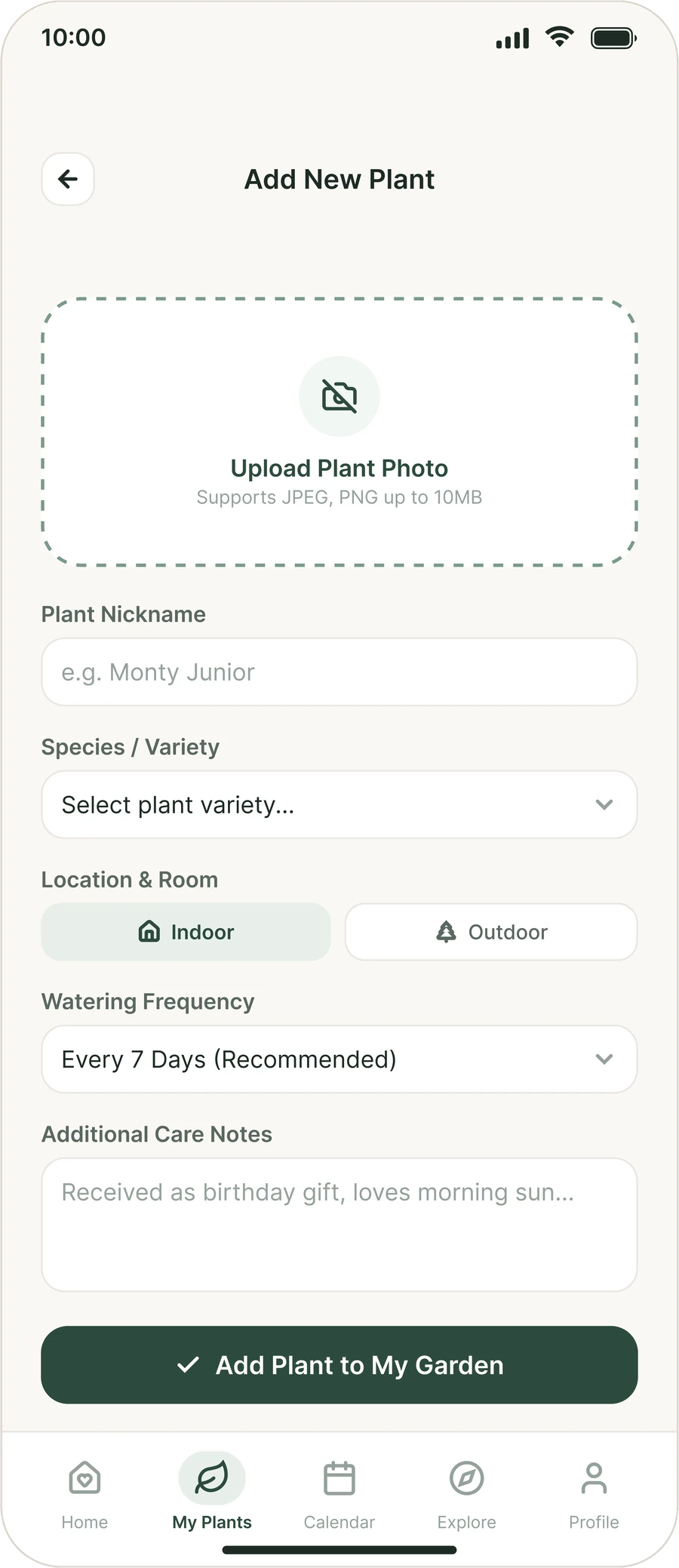
Rootine add plant form with a photo upload, nickname, species, location and watering frequency

Add a plant

Añadir una planta

One short form: a photo, a nickname, the species, indoor or outdoor, how often to water and any notes.

Un formulario corto: una foto, un apodo, la especie, interior o exterior, cada cuánto regar y notas.
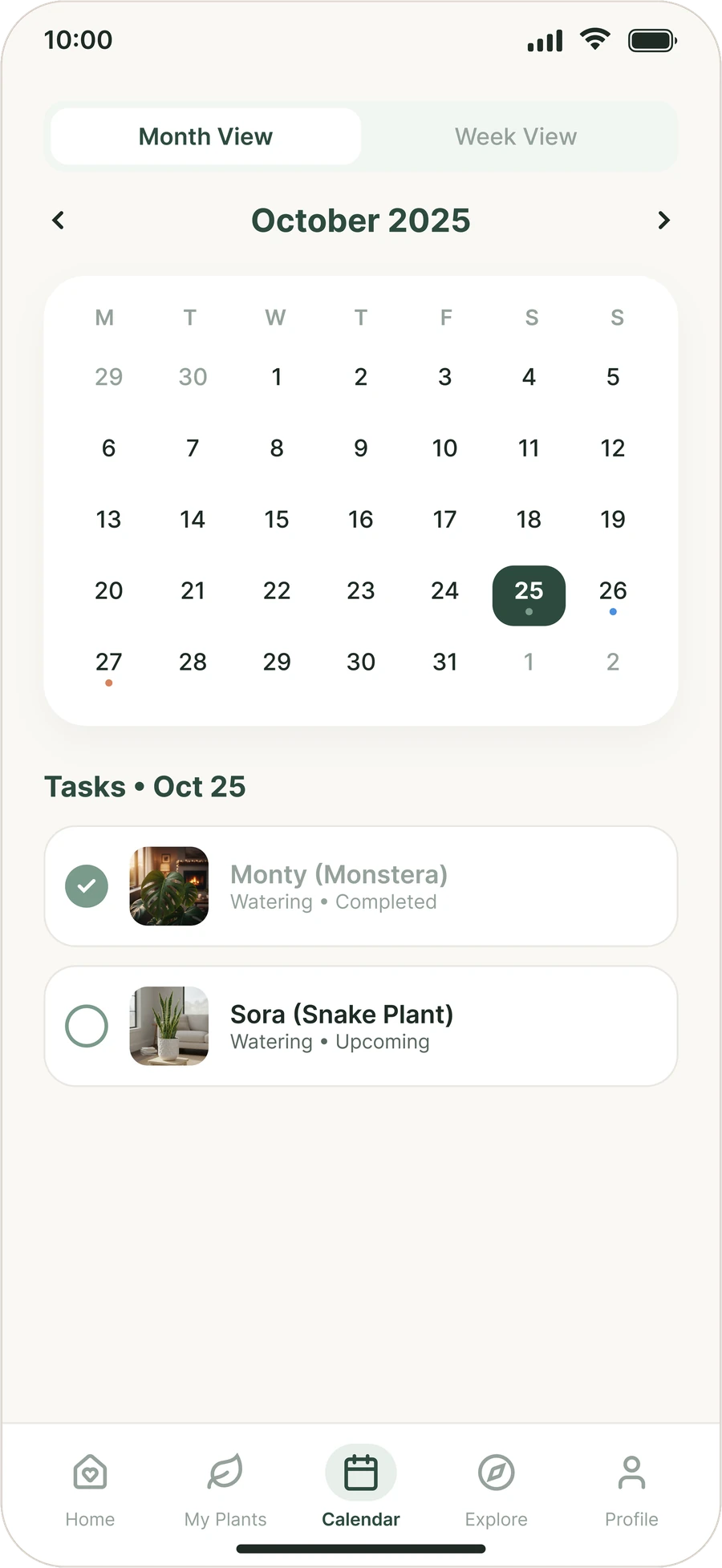
Rootine calendar in month view with the day’s care tasks listed below

Calendar

Calendario

Month and week views with a dot on the days that have care to do, and that day’s tasks below, each with its state.

Vistas de mes y de semana con un punto en los días que tienen cuidados, y debajo las tareas de ese día, cada una con su estado.
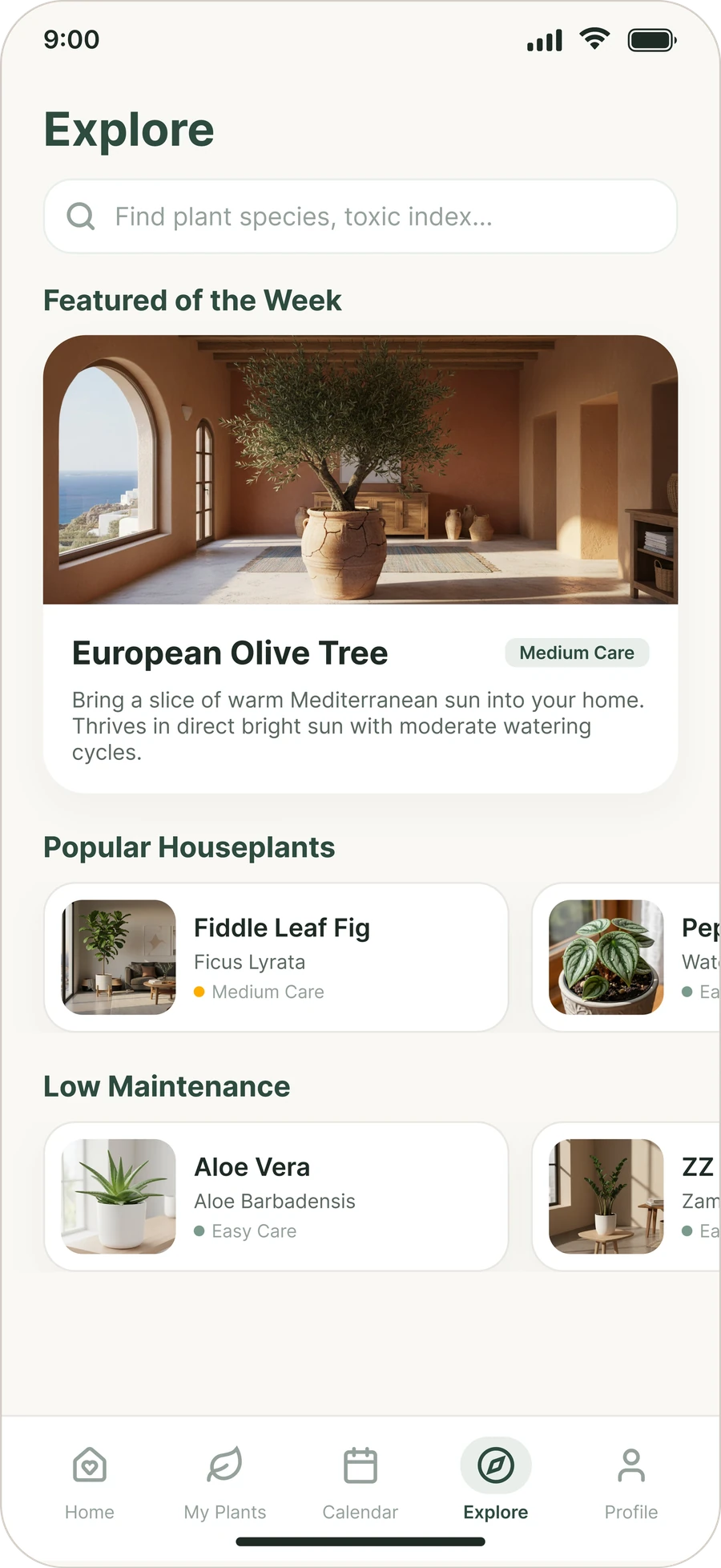
Rootine Explore screen with a featured plant, popular houseplants and low-maintenance picks

Explore

Explorar

Find a species before you buy it: a featured plant of the week, popular houseplants and low-maintenance picks.

Encuentra una especie antes de comprarla: una planta destacada de la semana, plantas de interior populares y opciones de poco mantenimiento.

05

Try it

Pruébalo

This is a working rebuild of the app, not a video. Tick off tasks, open a plant, add a new one, browse species and use the calendar.

Es una reconstrucción funcional de la app, no un vídeo. Marca tareas, abre una planta, añade una nueva, explora especies y usa el calendario.

Things to try

Qué puedes probar

  • Tick the tasks on Home. Plants update, and the care streak grows when all three are done.
  • Tap a plant to open its page and water it. It shows up in the watering history and on the calendar.
  • Tap the + button to add a plant. A photo from your device stays on your device.
  • In Explore, open a species and add it to your garden. The form fills in how often to water it.
  • In Calendar, switch between month and week, pick a day and open a task to see its plant. You complete it from the plant page.
  • In Profile, switch the language. This page follows.
  • Marca las tareas en Inicio. Las plantas se actualizan y la racha de cuidados sube al completar las tres.
  • Toca una planta para abrir su ficha y regarla. Aparece en el historial de riego y en el calendario.
  • Toca el botón + para añadir una planta. Una foto de tu dispositivo se queda en tu dispositivo.
  • En Explorar, abre una especie y añádela a tu jardín. El formulario ya trae cada cuánto regarla.
  • En Calendario, cambia entre mes y semana, elige un día y abre una tarea para ver su planta. Se completa desde la ficha.
  • En Perfil, cambia el idioma. Esta página lo sigue.

Sample data only. Nothing is saved or sent.

Solo datos de ejemplo. No se guarda ni se envía nada.

Open full screenAbrir a pantalla completa
06

What this is, and what it is not

Qué es esto y qué no es

Scope and limits

Alcance y límites

  • The prototype rebuilds the app from the Figma design: splash, home, My Plants, plant page, add plant, calendar and explore.
  • The Profile screen, the notifications and garden health sheets, and the species pages in Explore are not in the design. I added them so every button leads somewhere. The reminder settings in Profile only change on screen. No reminder is ever sent.
  • I also added behaviour the static design did not show: ticking tasks, watering from a plant page, search and filters, adding a plant, a calendar that follows the care history, and a streak that goes up. In the Calendar I left out the tick circle from the design: a task opens its plant page, where it is completed.
  • Everything is sample data. Dates are set to 27 October 2025 so that “3 days ago (Oct 24)” on the plant page holds. Arrival dates, light, humidity, care tips and the meaning of the calendar dots are my own content and reading.
  • The lists show 9 plants while the screens say 12, as in the design. Fernie comes from the second version of My Plants. Some rooms and watering days are invented to complete the list.
  • The colours, type sizes, radii and spacing in the design system section were measured from the final screens. The names and roles are my description of how the app uses them.
  • El prototipo reconstruye la app a partir del diseño de Figma: bienvenida, inicio, Mis plantas, ficha de planta, añadir planta, calendario y explorar.
  • La pantalla de Perfil, las hojas de notificaciones y de salud del jardín, y las fichas de especie en Explorar no están en el diseño. Las añadí para que cada botón lleve a algún sitio. Los ajustes de recordatorios del Perfil solo cambian en pantalla. No se envía ningún recordatorio.
  • También añadí comportamiento que el diseño estático no mostraba: marcar tareas, regar desde la ficha, búsqueda y filtros, añadir una planta, un calendario que sigue el historial de cuidados y una racha que sube. En el Calendario quité el círculo de marcar del diseño: una tarea abre la ficha de su planta, donde se completa.
  • Todo son datos de ejemplo. Las fechas parten del 27 de octubre de 2025 para que el «hace 3 días (24 oct)» de la ficha tenga sentido. Las fechas de llegada, la luz, la humedad, los consejos y el significado de los puntos del calendario son contenido y lectura míos.
  • Las listas muestran 9 plantas mientras que las pantallas dicen 12, como en el diseño. Fernie viene de la segunda versión de Mis plantas. Algunas estancias y días de riego son inventados para completar la lista.
  • Los colores, tamaños de letra, radios y espaciados de la sección de sistema de diseño se midieron a partir de las pantallas finales. Los nombres y los roles son mi descripción de cómo los usa la app.

Next steps

Próximos pasos

  • Prototype the adaptive reminders with real species and light data.
  • Design Profile and settings properly. The screen here is a placeholder.
  • Repeat the usability sessions on this coded prototype.
  • Raise the contrast of the secondary captions: Soft on Cream is only 2.5:1.
  • Prototipar los recordatorios adaptativos con datos reales de especie y luz.
  • Diseñar bien el Perfil y los ajustes. La pantalla de aquí es provisional.
  • Repetir las sesiones de usabilidad sobre este prototipo en código.
  • Subir el contraste de los textos secundarios: Soft sobre Cream es solo 2,5:1.